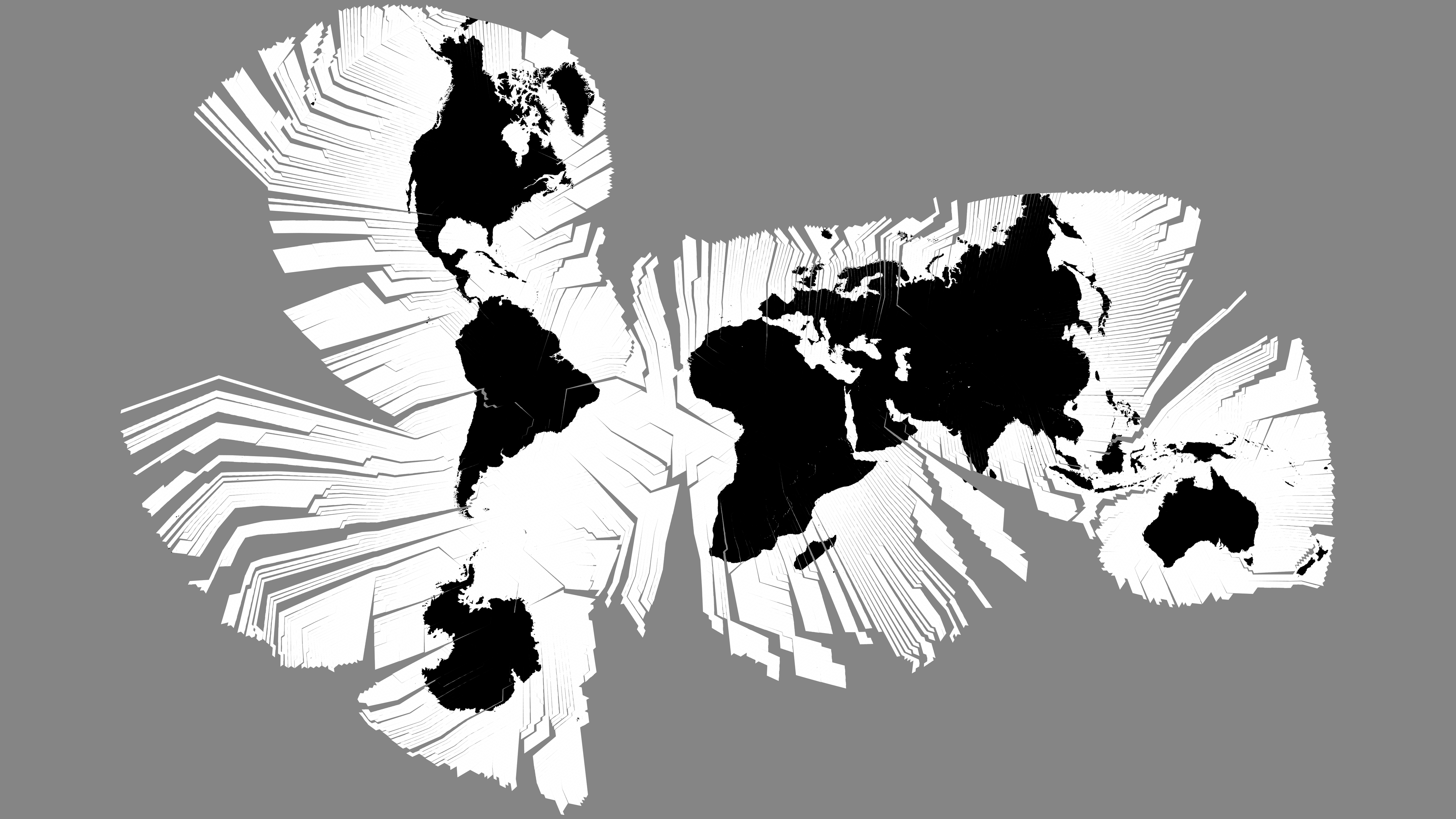
Illustrative Myriahedral WebAssembly overlay
Documentation index · Prerequisites · Complete example · Myriahedral implementation notes · Generation pipeline
Result
This workflow compiles the repository’s C++20 Myriahedral forward projection and a browser-oriented SVG generation function to WebAssembly with Emscripten. The example:
- constructs an exact
1920 x 1080Myriahedral projection; - generates a seam-aware 10-degree graticule and six city anchors in C++;
- exports the generator through Embind as
generateMapSvg(); - loads the checked-in Myriahedral reference raster in the browser;
- turns the generated SVG string into a Blob URL; and
- layers the SVG over the raster in one responsive 16:9 viewport.
This is an illustrative, copyable raster-overlay workflow. The current
all-projection quick start covers the
production runtime, typed geometry, slices, Canvas/SVG/D3, and workers. The
older Myriahedral compatibility option still generates only ocean and
land; this separate example keeps its graticule and city anchors over the
checked-in raster. The example filenames and outputs below remain local so
they cannot collide with either production module.
The build produces:
src.wasm/
├── index.html
├── myriahedral.mjs
├── myriahedral.wasm
└── smoke.mjs
The source raster remains at
assets.static/myriahedral/black-white-downsampled.png.
It is served as an ordinary browser asset rather than copied into the WASM
linear memory or Emscripten’s virtual filesystem.
flowchart LR
  CPP["C++20 Myriahedral<br/>projection + SVG generator"]
  EM["Emscripten 6.0.5<br/>Embind + ES module"]
  WASM["myriahedral.wasm"]
  GLUE["myriahedral.mjs"]
  SVG["generated SVG Blob"]
  PNG["registered source PNG"]
  VIEW["two-layer 16:9<br/>browser map"]

  CPP --> EM
  EM --> WASM
  EM --> GLUE
  WASM --> SVG
  GLUE --> SVG
  SVG --> VIEW
  PNG --> VIEW
Why 1920 by 1080 is exact
The checked-in raster is 4480 x 2520, and this implementation preserves
its complete 16:9 canvas as the registration contract:
4480 / 2520 = 16 / 9
1920 / 1080 = 16 / 9
No approximation is necessary: {1920, 1080} is itself the closest valid
frame. Both dimensions scale from the source by exactly 3/7:
4480 * 3/7 = 1920
2520 * 3/7 = 1080
The browser may display the composed map at a smaller CSS size, but the raster and SVG use the same intrinsic ratio and therefore remain registered without cropping or anisotropic stretching.
The ratio belongs to this fixed raster-compatible Myriahedral configuration, not to every possible Myriahedral cut tree. See the geometric context for that distinction.
What is compiled
The example includes the normal project headers:
#include <a60-io.h>
#include <izzi-svg.h>

#include "a60-carto-frame.h"
#include "a60-carto-projection.h"
#include "cart0freak0-myriahedral.h"
cart0freak0-myriahedral.h contains the depth-5 icosahedral subdivision,
the fixed 5120-face spanning tree, planar unfolding, hierarchical face search,
and affine forward transform. The browser build does not need the historical
myriaworld executable, GDAL, Boost, S2, or Natural Earth.
The wrapper in the complete example adds:
- the fixed web frame;
- face-aware graticule sampling;
- bisection at face transitions;
- SVG path serialization; and
- four small Embind exports.
The projection itself is still constructed by
make_myriahedral_projection() and every displayed coordinate comes from
myriaproj::meridians_to_point_2d().
Install and activate the local SDK
The local SDK manager is:
/home/bkoz/src/emsdk
The example was verified with Emscripten 6.0.5. Pinning the version makes the JavaScript glue shape and measured output reproducible:
cd /home/bkoz/src/emsdk
./emsdk install 6.0.5
./emsdk activate 6.0.5
source ./emsdk_env.sh
em++ --version
activate selects the compiler in Emscripten’s configuration;
emsdk_env.sh changes PATH and related variables only in the current
shell. Sourcing it from a shell startup file is optional and can also change
which Node executable other projects see.
The official Emscripten instructions describe the same
install, activate, and environment steps.
Prepare the example files
From the cartofreako repository root, create these local example sources beside the production WebAssembly adapters:
src.wasm/
├── index.html
├── myriahedral-web.cc
└── smoke.mjs
The complete contents of all three files are in complete Myriahedral example. They are kept in the documentation so the requested example consists only of the two web documentation pages; copy the fenced source blocks verbatim when running it.
Compile the ES module and WASM binary
With the SDK environment active and the current directory set to the cartofreako root:
mkdir -p src.wasm

em++ src.wasm/myriahedral-web.cc \
  -I src.projections \
  -isystem ../alpha60/src \
  -isystem ../izzi/src \
  -std=c++20 \
  -O3 \
  -Wall -Wextra -Wpedantic -Werror \
  --bind \
  --no-entry \
  -sMODULARIZE=1 \
  -sEXPORT_ES6=1 \
  -sEXPORT_NAME=createMyriahedralModule \
  -sENVIRONMENT=web,node \
  -sALLOW_MEMORY_GROWTH=1 \
  -sFILESYSTEM=0 \
  -o src.wasm/myriahedral.mjs
Alpha60 and Izzi are marked as system include directories so warnings inside
those neighboring header trees do not become errors in this wrapper’s strict
Clang build. src.projections/ remains a normal include path, so warnings in
the projection and adapter are still checked.
Linker and runtime flags
| Flag | Reason |
|---|---|
--bind |
Links Embind and exposes the named C++ functions on the module instance |
--no-entry |
Builds a callable library; the wrapper deliberately has no C++ main() |
-sMODULARIZE=1 |
Produces an asynchronous module factory instead of a global Module |
-sEXPORT_ES6=1 |
Emits an ES module with a default factory export |
-sEXPORT_NAME=... |
Gives the generated factory a useful internal/debug name |
-sENVIRONMENT=web,node |
Supports the browser example and the Node smoke test |
-sALLOW_MEMORY_GROWTH=1 |
Allows future, larger generated strings without fixing a large initial heap |
-sFILESYSTEM=0 |
Omits Emscripten filesystem support; this example returns SVG directly |
Emscripten’s
modularized-output documentation
defines the asynchronous factory used here. The
Embind documentation
describes EMSCRIPTEN_BINDINGS() and the --bind interface.
The .mjs file and .wasm file must stay together unless a custom
locateFile callback is supplied when creating the module.
Cache permissions in a sandbox or CI job
Emscripten normally writes compiled system libraries beneath its SDK cache. If that checkout is read-only to the build user, select a task-specific writable cache:
export EM_CACHE=/tmp/cartofreako-emscripten-cache
Do not share one writable cache between mutually untrusted jobs. A persistent
job-local cache is faster than /tmp for repeated builds.
Run the non-browser smoke test
The ES module includes Node support solely so the generated function can be checked without a browser:
node src.wasm/smoke.mjs
The smoke program:
- instantiates the module asynchronously;
- verifies the
1920 x 1080exports and raster path; - calls
generateMapSvg(); - requires the SVG view box, latitude and longitude groups, and an anchor;
- checks that exactly 53 graticule paths were generated;
- rejects
nanandinf; and - writes
src.wasm/myriahedral-1920x1080.svgfor inspection.
With Emscripten 6.0.5, the verified example produced:
{"wasmBytes":270756,"svgBytes":574903,"paths":53}
Exact byte counts can change with compiler and standard-library revisions. The dimensions, path count, IDs, and finite-coordinate checks are the stable contract.
Serve it over HTTP
WebAssembly is fetched asynchronously. Do not open index.html with a
file:// URL. From the repository root, use the SDK’s local server:
emrun \
  --no_browser \
  --serve_after_close \
  --serve_root "$PWD" \
  --port 8000 \
  src.wasm/index.html
Then open:
http://localhost:8000/src.wasm/index.html
--serve_root is important: it makes both src.wasm and the repository’s
assets.static directory available beneath the same origin. The official
emrun documentation
also explains browser launching, ports, and server lifetime.
For another web server, configure at least these content types:
| Extension | Content type |
|---|---|
.mjs |
text/javascript |
.wasm |
application/wasm |
.png |
image/png |
.svg |
image/svg+xml |
application/wasm permits efficient streaming compilation. A wrong MIME
type, a 404 for myriahedral.wasm, or opening the page from file:// are
the most common startup failures.
Browser-side generation and image loading
The page imports the generated factory:
import createMyriahedralModule from "./myriahedral.mjs";

const module = await createMyriahedralModule();
const svg = module.generateMapSvg();
Embind converts the returned std::string into a JavaScript string. The
page wraps it in a Blob, creates an object URL, and assigns that URL to the
upper <img> layer.
The lower <img> independently loads
assets.static/myriahedral/black-white-downsampled.png. Keeping the layers
separate has several advantages:
- the 1.2 MiB source raster stays out of WASM memory;
- the browser can cache and decode it normally;
- no Emscripten
.datapackage or virtual filesystem is needed; - the generated SVG remains downloadable by itself; and
- an SVG loaded as an image does not need permission to fetch an external nested image.
Both images have intrinsic 1920 x 1080 dimensions in the page and occupy
the same CSS aspect-ratio: 16 / 9 box. The source PNG is larger, but
downscales uniformly by 3/7.
The Blob URL remains live while the image and download link use it and is
revoked on pagehide. Revoking it immediately after setting src can race
the image decoder.
Seam-aware graticule generation
The Myriahedral surface has 5120 small spherical triangles. Tree edges are retained hinges; every non-tree edge is a cut. A plain SVG polyline must not connect samples across a cut because the two projected endpoints can lie on distant branches.
The example samples every parallel and meridian at 0.5-degree intervals. For each pair of adjacent samples it:
- finds both containing face indices;
- bisects a face change 48 times in geographic coordinates;
- projects the limiting point from each side;
- treats coincident limits as a retained hinge; and
- starts a new SVG subpath when the limits are separated.
At the 1920 x 1080 frame, a separation greater than
1920 * 1e-5 = 0.0192 output unit identifies a cut. Retained hinges agree
to floating-point precision, so this threshold is well above roundoff and
well below a visible jump.
The fixed sampling step makes the example readable and deterministic. It assumes no more than one face transition between adjacent samples. The production ocean-and-land renderer instead clips filled geometry to exact terminal-face triangles. This example’s line renderer should adaptively subdivide any interval that can cross multiple faces or whose projected chord error exceeds a display-space tolerance.
The example calls myriahedral_detail::containing_face() to expose the cut
topology. That is an implementation-detail dependency. The point transform
itself uses the public myriaproj API.
Initialization and responsiveness
The first module use constructs and unfolds the fixed 5120-face layout into a
function-local static object. Later projection calls reuse it. The example
then performs tens of thousands of forward queries while generating the
graticule, so generateMapSvg() can briefly occupy the browser’s main
thread.
For interactive production pages:
- instantiate the module and generate SVG in a Web Worker;
- post the SVG string or a transferable byte buffer back to the UI thread;
- cache the result by projection version, frame, and layer settings;
- consider generating one layer at a time for progressive display; and
- replace fixed sampling with a projected-error criterion.
The example keeps generation on the main thread to show the complete data flow without worker glue.
Perceptual considerations
The grayscale raster and blue/orange graticule are deliberately separate
visual channels. Thirty-degree lines are heavier than the other ten-degree
lines, city anchors have a white keyline, and
vector-effect: non-scaling-stroke keeps responsive resizing from making
the overlay unusably thin.
Several caveats remain:
- many short interruptions are intrinsic Myriahedral cuts, not missing data;
- dense lines near the poles can dominate local land detail;
- the source raster includes deliberate whitespace and branching geometry;
- the map is neither globally conformal nor exactly equal-area; and
- a generated graticule can look plausible even when one cut was joined incorrectly, so visual inspection at high zoom remains necessary.
The browser stage supplies one accessible label for the composed image and marks both child images decorative, avoiding duplicate screen-reader announcements.
Deployment and security
For deployment:
- serve the raster,
.mjs, and.wasmfrom versioned URLs; - enable Brotli or gzip for the text glue and WASM;
- give immutable hashed assets long cache lifetimes;
- keep the module and WASM on the same origin unless CORS is configured;
- permit
blob:in the Content Security Policy’simg-srcdirective for the generated SVG object URL; and - preserve the source raster’s provenance and licensing information.
If blob: is disallowed, insert the generated SVG markup into a carefully
controlled container instead. Do not do that with untrusted SVG strings; this
example’s SVG is entirely generated from fixed C++ data.
Troubleshooting
| Symptom | Likely cause and correction |
|---|---|
em++: command not found |
Source /home/bkoz/src/emsdk/emsdk_env.sh in the current shell |
| SDK cache is not writable | Set EM_CACHE to a writable job-specific directory |
| Alpha60 unused-parameter warning becomes an error | Keep Alpha60 and Izzi on -isystem paths as shown |
| Browser reports a WASM MIME error | Serve .wasm as application/wasm |
| Browser fetches the wrong WASM path | Keep .mjs and .wasm together or pass locateFile |
| Raster is 404 | Serve from the repository root and retain the src.wasm/ layout |
| Overlay is missing under a strict CSP | Allow blob: for images or use a reviewed inline-SVG strategy |
| Projection rejects the frame | Use an exact 16:9 pair such as 1920 x 1080, not an approximate decimal ratio |
| Long lines bridge separate branches | Preserve face-transition bisection and split at detected cuts |
Documentation index · Complete example · Myriahedral implementation notes · Generation pipeline